
Overview
Data Ingestion Studio gives sales, marketing and RevOps teams a controlled route from exported spreadsheets to clean, connected HubSpot records. Instead of rebuilding the process for every file, teams prepare, map, match and review data in one guided workspace, then download import-ready files or confirm a supported automated import.
Use it yourself, or work with Cat Media on a fully managed import process. The service and the software share the same goal: less manual administration and a more reliable data foundation.
What this helps you do
- Move from imports to CRM health review with CRM Audit Summary in the separate furball Docs knowledge base.
- Bring webinar registrations, attendance and conference leads into a consistent follow-up process.
- Prepare trade-press conversions, partner campaigns and exports from other business systems.
- Split one source table into separate company, contact and note outputs, and reuse a source column across several properties.
- Find existing companies without relying on a domain, and match contacts by email address or record ID.
- Standardise countries, regions and phone numbers, and interpret dates and time zones consistently.
- Turn free-text columns into notes with the right date, owner and associations.
- Import marketing-event registration and attendance, and create segments for follow-up.
- Review every warning before anything changes in HubSpot.
Why it matters
Repeated imports can introduce inconsistent values, duplicate records and gaps in campaign context. Each one makes routing, segmentation, reporting and attribution less reliable. Controlling how data enters HubSpot protects the quality of everything that depends on it.
Cat Media developed the Studio from experience with thousands of spreadsheets over five years. That experience shapes the workflow, but it does not mean every file is interpreted automatically. Your team still reviews the source selection, mappings and record decisions.
How it works
Start at imports.furball.tech, choose the HubSpot portal and upload a CSV or XLSX file. Each import then moves through five stages:
- Upload: Choose the worksheet, header row and the rows and columns to process.
- Prepare: Profile and clean each column without changing the original file.
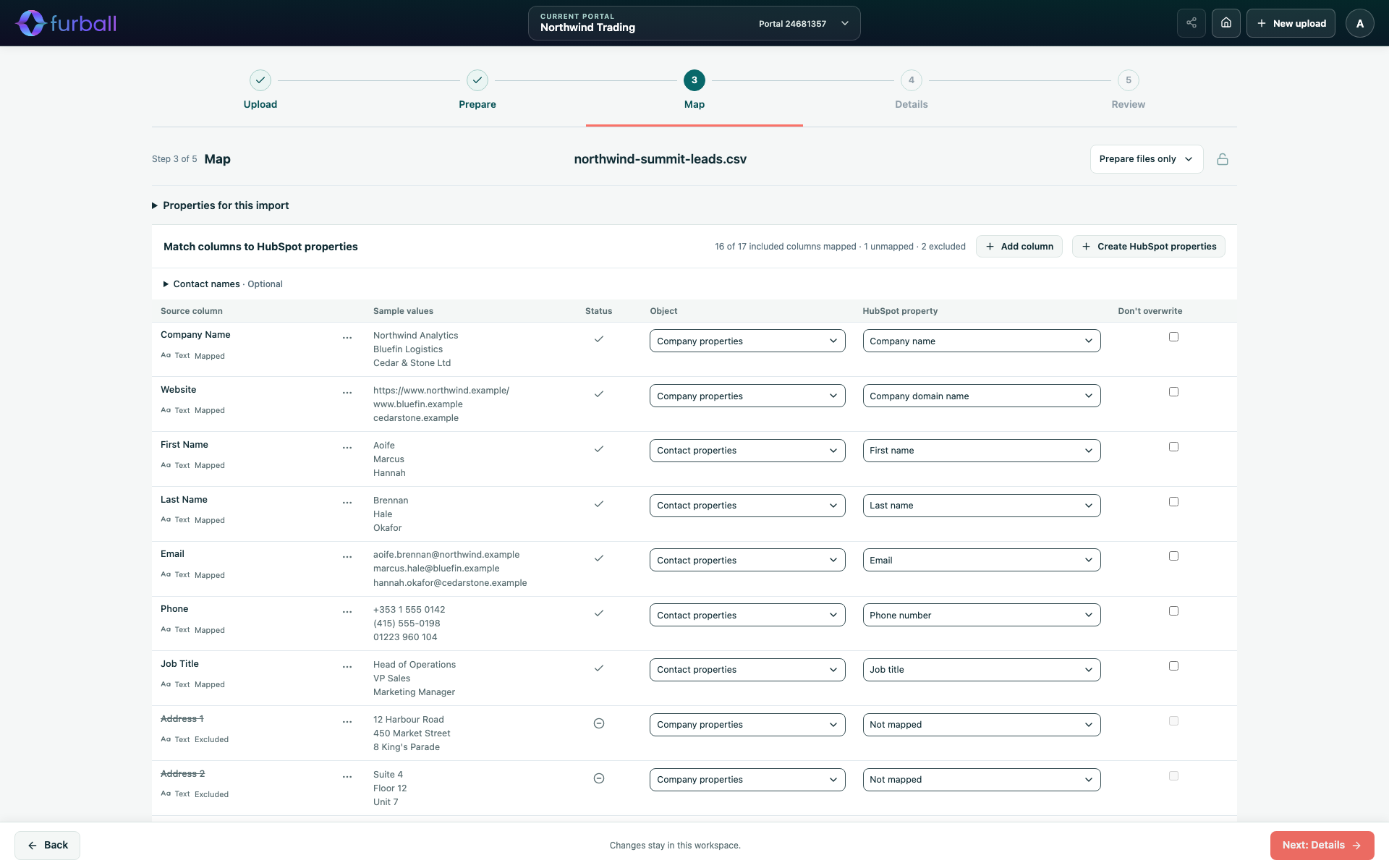
- Map: Connect columns to HubSpot company, contact and note properties.
- Details: Choose outputs, import modes, matching, standardisation, notes and events.
- Review: Prepare the files, resolve warnings and correct individual rows.
Then choose a delivery path:
- Prepare files only: Download import-ready files with instructions for HubSpot's import tool. Nothing is written to HubSpot by the Studio.
- Automated ingestion: Where enabled for the portal, review a confirmation summary and let the Studio import companies, contacts, notes, event participation and segments for you.
Find the right guide
- Getting started: Get Started with Data Ingestion Studio, How Data Ingestion Studio Works, and Choose a Portal and Manage Import History.
- Upload and prepare: Upload a File and Choose the Data to Process, Clean and Prepare Source Columns, and Combine Addresses, Split Names and Prepare Emails.
- Map properties: Map Columns to HubSpot Properties, Review Dropdown, Checkbox and Owner Values, and Create HubSpot Properties and Dropdown Options.
- Details and matching: Choose Outputs, Import Modes and Record Identifiers, Standardise Countries, Regions and Phone Numbers, Interpret Dates, Times and Time Zones, and Match Incoming Records to Existing HubSpot Records.
- Notes and events: Create Notes from Source Data, Import Marketing Event Registration and Attendance, Create HubSpot Segments from an Import, and Prepare Contact Custom Event Files.
- Review and delivery: Review Results and Correct Source Rows, Download Prepared Files and Import Them into HubSpot, Import Directly into HubSpot with Automated Ingestion, and Track, Stop and Recover an Automated Import.
- Teamwork and administration: Share Imports and Work Safely with Your Team, Manage Studio Portal Settings and Defaults, and Connect HubSpot Portals and Manage Staff Access.
- Guidance: Data Ingestion Studio Best Practices and Troubleshoot Data Ingestion Studio.
A first step towards integration
File-based imports can get useful data moving before a full integration is justified. Use real exports to check how records should connect, agree on mappings and resolve data-quality issues. Cat Media can use those findings to help design an integration with your wider systems.
This is not automatic two-way synchronisation. API inputs and scheduled jobs are planned Studio capabilities, described in Furball Roadmap: From Imports to Data Orchestration in the separate platform knowledge base.
What to do next
- Read Get Started with Data Ingestion Studio for the first-import workflow.
- Agree whether your team or Cat Media will manage preparation, review and delivery.
- Use CRM Audit and Matching and Deduplication in app.furball.tech to assess and improve data already in HubSpot.