
Overview
Country, region and phone values are rarely consistent in source files. The Studio can standardise them before import so HubSpot receives clean, comparable values. Location and phone standardisation are separate options, so you can use either or both.
What this helps you do
- Turn variants such as "Ireland", "IRL", "IE" and "Republic of Ireland" into one consistent country value.
- Standardise states, provinces and counties for each country.
- Format phone numbers in a consistent international format.
- Spot invalid or ambiguous phone numbers before they reach HubSpot.
Standardise countries and regions
In Details > Locations and phones, turn on Standardize mapped countries and regions.
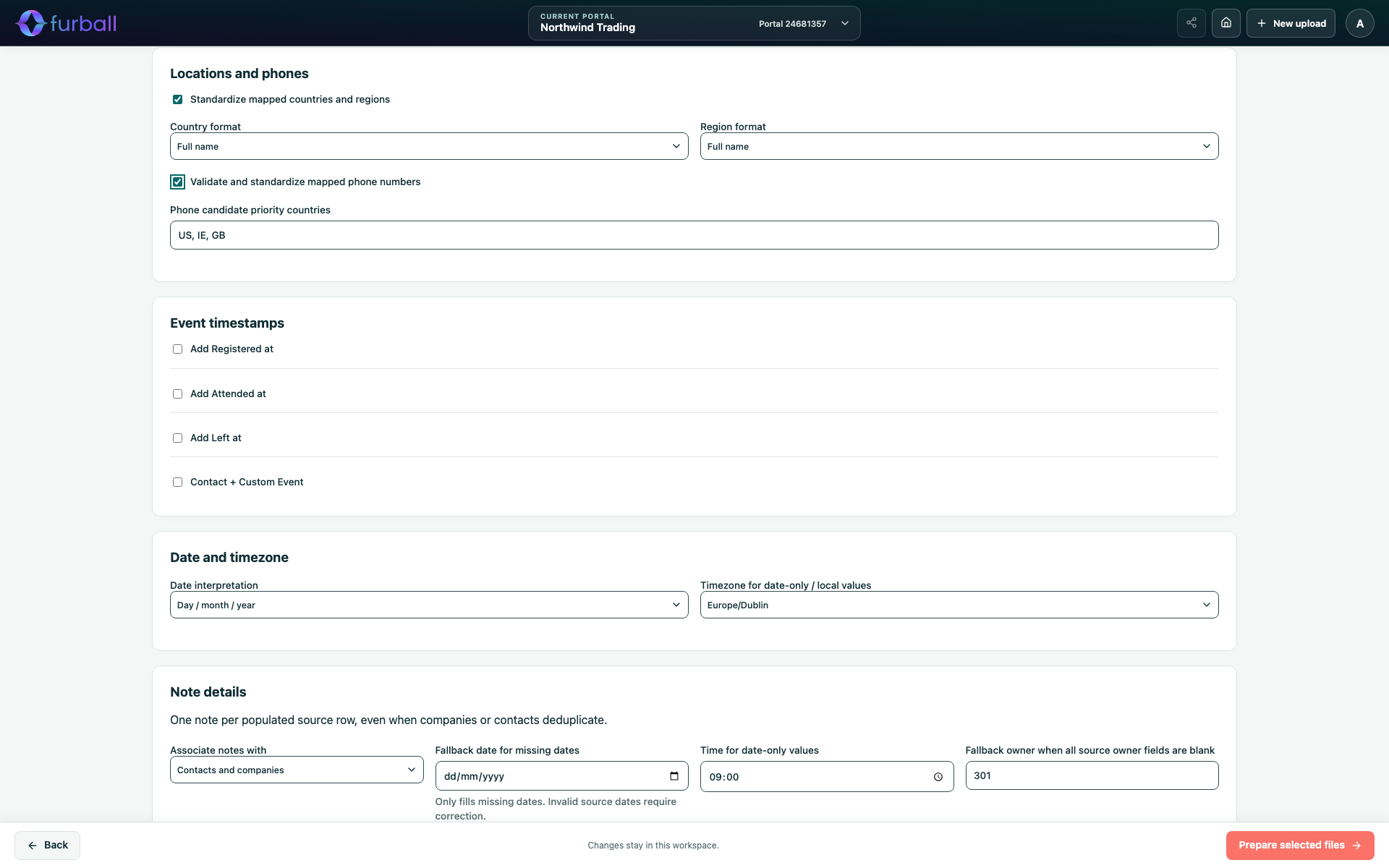
Choose the output formats:
- Country format: Full name or ISO country code.
- Region format: Full name or Subdivision code.
How values are recognised:
- Countries are recognised from names, common alternative names, two- and three-letter codes, and close spelling mistakes.
- Regions are matched within their country, allowing for small spelling differences.
- When a row has no country, a region that clearly belongs to one country can supply it.
- A missing contact country can use the mapped company country, and the other way round.
- Values that can't be recognised confidently are kept as they are, with a warning in Review.
This applies to mapped country and region properties on companies and contacts.
Validate and standardise phone numbers
Turn on Validate and standardize mapped phone numbers to process mapped phone, mobile and fax properties.
- Valid numbers are formatted in the international E.164 format, for example +353 followed by the number without spaces.
- The row's country helps interpret local numbers.
- When there is no country, the Studio compares likely countries. Phone candidate priority countries break ties between equally likely matches. They do not override clear evidence. The default priorities are United States, Ireland and United Kingdom.
- Invalid numbers leave the mapped phone property blank, so HubSpot doesn't receive a value that can't be dialled. The original value is kept for review.
The prepared files also include companion columns with the original value, any extension, whether the number is valid, the carrier, the detected region, how it was matched and whether it was ambiguous. Excluded columns don't generate companion columns.
Review location and phone results
Review shows warnings for unrecognised countries or regions, invalid numbers, numbers that are only possible rather than valid, and ambiguous country guesses.
Use Country, region & phone decisions in a row to:
- Accept value: Keep the standardised value.
- Replace it with a value you choose.
- Leave the property blank.
- Choose Automatic to remove your decision and return to the Studio's result.
See Review Results and Correct Source Rows.
Save defaults
Use Settings > Location and Settings > Phone to save the preferred options for future imports. Changing the options for one import never changes the saved defaults.
Why it matters
Consistent countries and regions make territory assignment, routing, segmentation and reporting reliable. Standardised phone numbers are easier to dial, deduplicate and use in calling or messaging tools. Flagging uncertain values helps your team fix them deliberately rather than importing guesses.
What to do next
- Review warnings in Review before preparing final files.
- Agree priority countries that reflect where most of your customers are based.